A productive LoloBuy keyword search starts with a buying decision, not with a brand name or an endless list of links. Write the item, its use and the one or two attributes that would make you reject it. Then build a short query, compare several live source listings and save the exact option only after the evidence agrees.
LoloBuy's public site says an order can begin by pasting a Chinese product link. That makes the quality of the link important, but it does not mean the platform has verified every title, picture, variant or seller claim. Search is discovery. The live listing is the offer. Warehouse photos later document the item that arrived. Keeping those roles separate produces a spreadsheet that remains useful after the first exciting image disappears.
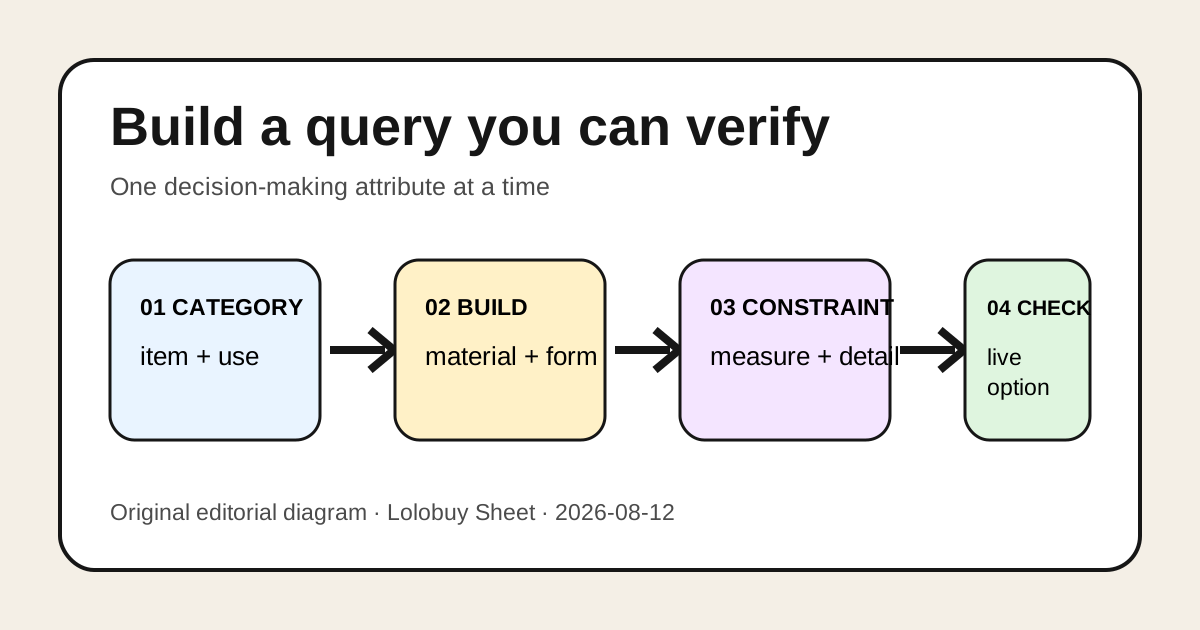
Move from a vague idea to a listing you can verify.
Add one decision-making attribute at a time, then stop searching long enough to compare the live source records.
Category
Name the item and intended use.
Construction
Add material, shape or functional detail.
Constraint
Add the measurement, color or feature that changes the choice.
Verification
Open, compare and save the exact live option.
01
Define the decision before choosing keywords
Start with a one-line brief: item type, intended use, must-have detail, measurement constraint and acceptable compromise. A useful brief might be “midweight zip hoodie, plain front, chest measurement published, dark neutral color; minor packaging damage acceptable.” It is much stronger than “best hoodie” because every phrase can be checked on a listing or, later, in warehouse evidence.
Separate searchable attributes from claims that the page cannot prove. Color, closure type, dimensions, visible pocket layout and a printed size chart are searchable. Comfort, durability, authenticity and “premium quality” are conclusions that usually require evidence beyond a seller title. Do not put a persuasive adjective into your spreadsheet as if search results had verified it.
- Item and intended use
- One construction or material term
- One measurement or fit constraint
- One visible feature that changes the decision
- A compromise you are willing to accept
02
Build a query ladder instead of one giant search
Use three or four short searches. Begin with the category, then add a construction term, then a feature or measurement. For a bag, the ladder could be “crossbody bag,” “nylon crossbody bag,” “nylon crossbody bag zip top,” and finally “nylon crossbody bag zip top 25 cm.” For shoes, it might move from shoe type to upper material, outsole style and a clearly defined insole or foot-length chart.
A long query often hides which word improved or damaged the results. A ladder lets you notice that adding “waterproof” produces only vague marketing, while adding “sealed zip” produces listings with visible construction details. Keep the term that improves evidence, remove the term that merely produces hype, and record useful alternate wording in a notes column.
RELATED DECISION PATHS
Continue with the evidence that answers the next question.
These links sit inside the guide because each one covers a decision that follows directly from this step.
03
Use nouns for identity and modifiers for decisions
The noun should identify the product clearly: hoodie, tote, running shoe, jersey or phone stand. Modifiers should describe something a buyer can compare: cropped, full-zip, embroidered, removable strap, metal buckle, wide toe box, measured insole or replacement part. Model codes and seller variant names can be valuable when they are copied exactly, but do not invent an English name that collapses several options into one.
Translate for understanding while preserving the original option text or code. Two colors that both appear “black” in translation may carry different seller labels, hardware colors or batches. A spreadsheet can show a readable English note alongside the source wording. The source wording is the audit trail; the English note is navigation.
04
Compare candidates with the same five columns
Stop opening new tabs once three to five plausible candidates exist. Compare them in fixed columns: exact source URL, selected option, evidence for the required attribute, current item price plus displayed China-side delivery, and unresolved question. Fixed columns expose missing information. One listing may show a detailed chart but no material composition; another may name a material but omit dimensions.
Do not declare two listings identical because they reuse photographs. Shared images do not prove the same seller, batch, option, measurements, after-sales terms or physical item. Treat each URL as a separate offer. If two listings appear similar, compare identifiers, option labels, price structure, seller page and description rather than merging them into a single “duplicate.”
- Source URL and check date
- Exact color, size, quantity and variant code
- Evidence for the must-have attribute
- Current product price and displayed domestic freight
- One unresolved question or reason to reject
05
Read price results as variant prompts, not final totals
A search-card price can belong to the cheapest accessory, deposit, smallest size or another option. Open the source and select the intended variant before recording a price. Keep product price, seller-to-warehouse freight and later international parcel cost in separate fields. LoloBuy's public workflow supports link ordering and later consolidation, but the homepage does not publish one permanent total for every item or route.
Use a price range while comparing. If the option cannot be selected or its China-side delivery is unclear, label the number “unconfirmed” rather than silently using the lowest visible figure. The goal of keyword search is to produce a defensible shortlist, not an artificially cheap basket.
06
Verify the link before saving it as a find
Open the URL in a clean session and confirm that it resolves to the intended product rather than a search page, seller homepage, login redirect or expired promotion. Check the title, seller identity, selected option, quantity, price structure, size or dimension evidence and visible restriction notes. Save the date because a valid link today can change tomorrow.
Then paste the source link into the current LoloBuy order flow and compare the generated order with the source. Confirm that the recognizable product, chosen color, size, quantity and displayed costs survived parsing. If the system cannot read the page, do not “repair” it by substituting an unrelated lookalike. Preserve the original source and use the current manual-order or support route only if the interface actually offers one.
07
Turn good searches into reusable spreadsheet fields
A good spreadsheet records why a result was saved. Add a primary query, useful alternate term, source marketplace, listing check date, exact variant, decision evidence, missing evidence and next review date. This turns keyword research into maintenance. If a link dies, the saved nouns and decision modifiers can recreate the search without pretending the replacement is identical.
Use controlled labels for status: candidate, source verified, option verified, ordered, warehouse received, QC reviewed, rejected or archived. Do not mark a listing “QC passed” before a physical warehouse record exists. LoloBuy publicly describes warehouse inspection and photographs after arrival; seller photos are not that warehouse evidence.
08
Know when to stop searching
More results are not automatically better. Stop when at least two candidates meet every non-negotiable condition, their exact options can be selected, and the remaining differences are matters of preference or current cost. Continue only when a required measurement, compatible part, material statement or route-sensitive feature is still missing.
A practical stop rule is fifteen focused minutes or five viable listings, whichever comes first. Review the comparison table before opening more pages. If none qualifies, rewrite one constraint or move to a more precise synonym; do not lower every standard simply because the search produced attractive images.
09
Carry the search record into warehouse review
After an item arrives, compare the warehouse record with the saved source and selected option. Check identity first, then color, labelled size, quantity, visible construction and the one feature that justified the choice. Requesting a more specific view makes sense only when the current account offers it and the result could change the decision. The public homepage does not establish a universal number or price for extra images, videos or measurements.
LoloBuy currently advertises 180 days of free storage and the ability to combine warehouse items into an international parcel. Those statements provide planning context, not a reason to postpone an item-level problem. Storage time is not a universal seller return window. Resolve a material mismatch using the action and terms shown for that order before authorising international shipment.
10
A compact search record to reuse
For each find, keep: buying brief, query ladder, exact URL, date checked, selected option, current price fields, source evidence, uncertainty, warehouse checkpoint and final decision. Remove stale claims rather than changing the date alone. Never store passwords, payment details, full addresses or private support messages in a shared sheet.
The method is deliberately slower than saving every promising thumbnail and much faster than repairing a basket of ambiguous variants. A LoloBuy keyword search is successful when another person can see what you wanted, why a listing qualified, which live option you chose and what still needs verification. That is the difference between a searchable decision record and a random collection of links.
SOURCES
Research basis
Platform claims and customer observations are kept separate. The notes below identify the research basis without sending visitors away from this guide. Confirm current account terms before acting.
- LoloBuy public website — checked August 12, 2026Primary source only for starting an order with a pasted Chinese product link, warehouse inspection and photographs, 180 days of free storage, and parcel consolidation. It does not define a universal search vocabulary or guarantee any listing.
- Lolobuy Sheet query-and-variant frameworkThe keyword ladder, comparison table and stop rules are independent editorial methods for product discovery; they are not platform policies or seller guarantees.