A Weidian link looks simple: copy a product URL, paste it into a buying service, choose an option and pay. Most avoidable errors, however, happen between those verbs. A listing can contain many colours, sizes or versions; the first photograph may not match the selected option; the lowest price can belong to an accessory or deposit; and a translated label can lose the detail that distinguishes one variant from another.
LoloBuy's identified community ordering guide explicitly includes Weidian among the marketplaces users can browse. It instructs shoppers to copy the product URL, paste it into the LoloBuy search bar or order form, and specify details such as size, colour and quantity. The same guide says the order view provides the item price and domestic shipping charges before the later warehouse and international-shipping stages. Those statements explain the intended workflow, but they do not remove the buyer's need to compare the generated order with the live source listing.
This guide turns a Lolobuy Weidian link into a repeatable evidence trail. It does not publish an invite code, assume a fixed fee or send readers to a temporary promotion. The goal is to reduce wrong-variant orders, make warehouse QC easier to interpret and preserve the information needed if a material mismatch appears.
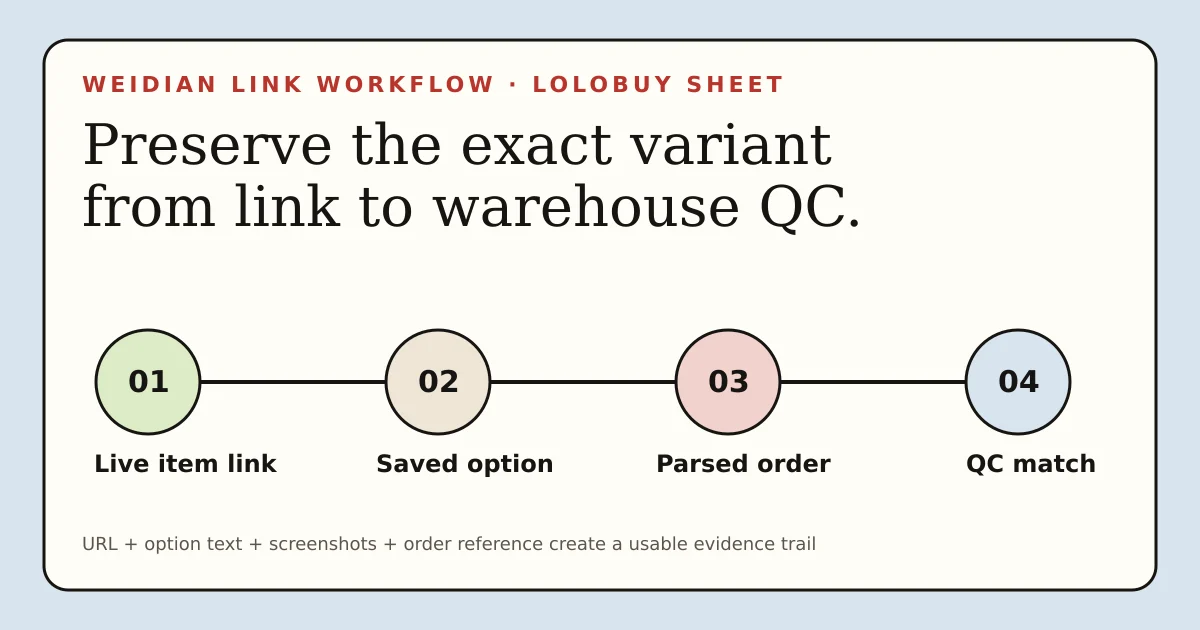
A product URL is the start of the evidence trail.
The source listing identifies the seller offer. The generated order records your choice. Warehouse photos document what physically arrived.
Source link
Open the live Weidian item and identify the exact option.
Order record
Compare parsed title, price, colour, size and quantity.
Warehouse arrival
Match the item and QC evidence to the saved order.
Parcel decision
Ship only after the mismatch and cost checks are complete.
01
Understand what the Weidian link proves—and what it does not
A Weidian item URL identifies a seller-controlled page at a point in time. It can expose the product title, images, available variants, current price and other listing information. It does not prove that the seller will keep the item available, that every image shows the selected option, that translated text is complete, or that the physical item will match the presentation.
A link inside a spreadsheet adds another discovery layer. It may help you reach a product quickly, but it does not certify the seller, product quality, authenticity, return eligibility or delivered cost. Open the live source page and make the purchase decision from the current option selector and order record, not from a saved card alone.
02
Copy the product URL only after opening the live item
Open the Weidian item in a browser and let any shared or shortened address resolve to the current product page. Confirm that the page still shows the intended item. Then copy the final product URL from the address bar or the marketplace's own sharing control. A documented community example pairs a normal Weidian item URL containing an item identifier with a LoloBuy product-detail URL that carries the source address. That demonstrates one working relationship, not a format that should be hand-built or guessed.
Do not manufacture a LoloBuy product-detail address by changing numbers from somebody else's link. Paste the source product URL through the current LoloBuy input instead. If the link cannot be read, stop and clarify it through the current order workflow rather than choosing a visually similar result.
RELATED DECISION PATHS
Continue with the evidence that answers the next question.
These links sit inside the guide because each one covers a decision that follows directly from this step.
03
Record the exact seller offer before pasting
Write a short source note before leaving Weidian: seller or shop name, item title, selected colour, size or version, quantity, visible item price, China-side delivery charge if shown, and the date checked. Save the relevant size chart and the images that define the option. This record is especially important when the listing uses Chinese option text or combines many models on one page.
Treat promotional prices carefully. A headline amount may depend on a different variant, quantity, deposit, member condition or temporary campaign. Select the intended option before comparing the payable amount. If a required detail is missing—such as a shoe measurement, garment dimension or included accessory—do not replace it with an assumption.
- Source URL and date checked
- Seller or shop name
- Exact colour, size, version and quantity
- Visible item price and China-side delivery
- Saved chart, option text and decisive images
04
Paste into Lolobuy, then compare the generated order line by line
The identified LoloBuy ordering guide says to paste the product link into the search bar or order form and specify size, colour and quantity. After the page is parsed, compare the generated product image and title with the Weidian source, but do not stop there. Check the selected option text, item price, quantity and domestic shipping. A matching hero image cannot compensate for a wrong size or version.
If the generated data is incomplete, preserve the original option wording in the order remark or the current clarification field when one is available. Use concise, observable language: the exact colour name, labelled size, version code or included piece. Avoid vague instructions such as “same as photo” when the listing contains several photos.
05
Separate the first payment from the delivered total
The LoloBuy community guide describes the item price and domestic shipping during order submission, then places warehouse arrival, consolidation and international shipping later in the process. That separation matters. Paying for the product does not establish the final freight cost, because the packed weight, dimensions, eligible route, protection and destination obligations are not yet complete.
Build a range rather than one confident total. Include the selected item, China-side delivery, any clearly displayed current service or payment charges, packaging, international freight and destination taxes or customs charges. Do not copy a per-kilogram figure from another parcel and present it as the price for yours.
06
Use the warehouse arrival as a second comparison point
LoloBuy's public website states that warehouse arrivals are inspected and photographed, and it advertises 180 days of free storage. When a Weidian order reaches that stage, compare it with the source note you saved: product identity, colour, labelled size, quantity, included pieces and visible condition. The warehouse record should be tied to the original order, not judged from memory.
The public homepage does not publish a universal number of free QC photographs, a permanent extra-photo price, a guaranteed measurement service or one return rule for every seller. Work with the evidence and actions shown for the current order. If one decisive area is missing, request a precise angle or measurement only when that option is available and before any applicable decision window closes.
07
Match QC checks to the product category
For shoes, start with the matching pair, labelled sizes, colour, overall shape, panel alignment and sole attachment. For hoodies and other garments, confirm the design, size label, chest or length measurements, print placement, seams, stains and closures. For bags, check dimensions, silhouette, compartments, straps, attachment points, zips and included detachable pieces.
Photographs have limits. Lighting and compression can change colour and texture, while perspective can exaggerate asymmetry. Images cannot prove material composition, comfort, durability, electrical function, waterproofing, authenticity or legal import eligibility. Use them to answer visible questions and avoid claims they cannot support.
08
Respond to a wrong option with specific evidence
A useful mismatch report names the ordered option, the received detail, the photograph that shows the difference and the requested outcome. For example: “The saved order shows EU 42, while warehouse image 3 shows an EU 41 size label.” That is easier to evaluate than “wrong item.” Attach the saved Weidian option and the generated order record when the workflow permits.
Do not promise that every mismatch creates a free return. Seller terms, listing conditions, timing, product category and the reason for the request can affect the remedy. The defensible advice is to inspect promptly, preserve the evidence and use the current order action before authorising international shipment.
09
Keep dead or changed Weidian links from breaking your record
Marketplace listings can change or disappear. A dead link does not erase the order, but it can remove the easiest evidence of what was offered. Keep the original URL, screenshots, option text, price and order number together. If the seller replaces the page content, your dated record helps show what you selected at the time.
For future discovery, a store page may help locate a replacement listing, but it is not interchangeable with the exact item URL. A new product page can use different options, prices or terms. Treat it as a fresh listing and repeat the checks rather than attaching it to an old order.
10
A clean Lolobuy Weidian workflow
Start at the live Weidian item, not a screenshot. Select the exact option, record the seller evidence and copy the source URL. Paste that link through the current LoloBuy order flow, then compare every generated field with the source. Pay only when the variant and China-side cost are clear. At warehouse arrival, match the physical evidence to the saved order and resolve material differences before international shipment.
This method is deliberately slower than blind copying and faster than repairing a preventable mistake. It also creates better evidence for customer support and better source material for a genuine haul review. A useful review can then state exactly which Weidian listing was used, what reached the warehouse, what the QC showed, what the packed parcel cost and how the delivery ended.
- Discover through the directory; decide on the live listing.
- Save the exact variant before submitting the URL.
- Compare the parsed order rather than trusting the image.
- Use warehouse QC as a second evidence check.
- Judge shipping only from the prepared parcel and delivered result.
SOURCES
Research basis
Platform claims and customer observations are kept separate. The notes below identify the research basis without sending visitors away from this guide. Confirm current account terms before acting.
- LoloBuy public websitePrimary source for public link-ordering, warehouse inspection, photography and 180-day storage claims.
- Identified LoloBuy community ordering guideStates that users can copy links from marketplaces including Weidian, paste them into the order flow and specify size, colour and quantity.
- Documented Weidian-to-LoloBuy order exampleShows a source Weidian item URL alongside the corresponding LoloBuy product-detail URL; treated as one observable example, not a permanent URL rule.
- Weidian public websitePrimary source confirming the marketplace and its current public product and shop surfaces.