A useful LoloBuy 1688 find is not simply the listing with the lowest number beside the product photo. It is an offer whose minimum quantity, pricing unit, exact SKU, intended count and seller conditions can all be written in one unambiguous order line. If any part is missing, record a question rather than calculating a bargain that may not exist.
LoloBuy's public website says a shopper can begin by pasting a Chinese product link and later review warehouse inspection photographs. That supports a link-to-warehouse workflow, but it does not make every 1688 page retail-ready or verify a seller's claims. The source listing controls the offer. Your spreadsheet should preserve what the page showed on the day you checked it and make uncertainties visible before payment.
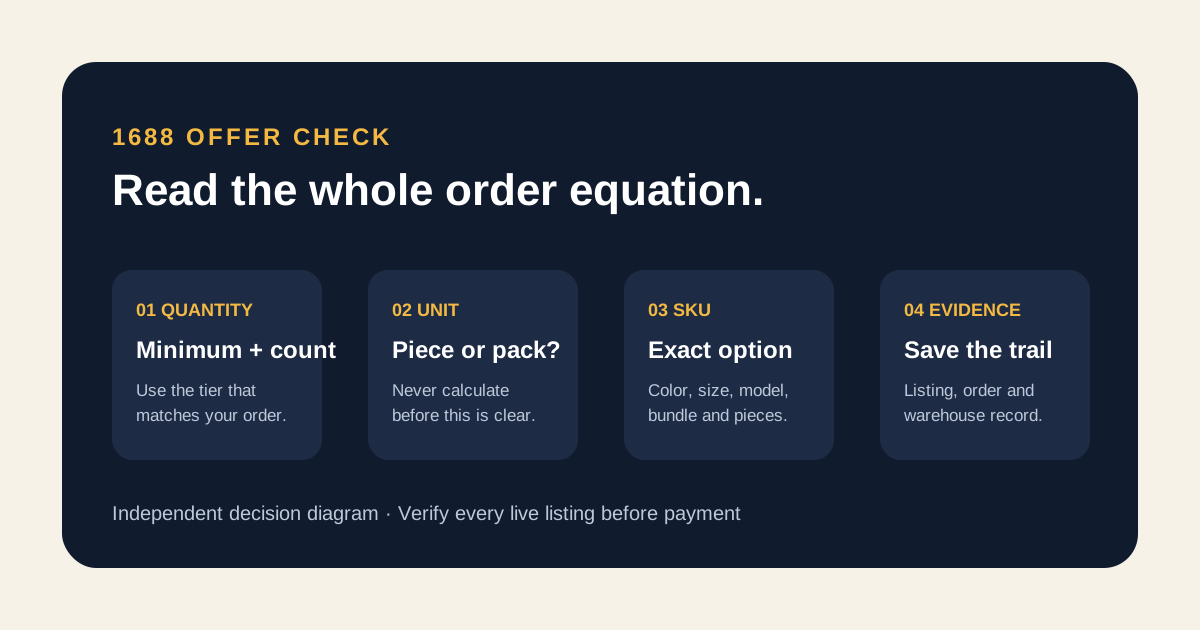
Read quantity, unit, SKU and evidence as one offer.
A low displayed price is meaningful only after the minimum, unit, selected variant and seller conditions are clear.
Quantity
Minimum, intended count and any visible tier.
Unit
Piece, pair, set, pack, metre or carton.
SKU
Exact colour, size, model and bundle.
Evidence
Saved listing, order audit and warehouse check.
01
Start with the use case, not the apparent unit price
Write what you actually need: product, purpose, quantity, acceptable variants and the maximum surplus you could use. Someone sampling one storage pouch has a different decision from a buyer sourcing twelve identical pieces. A listing only qualifies when the available order quantity fits the real use case. Buying unwanted units to reach a lower tier can increase product cost, domestic delivery, warehouse handling and international parcel weight.
Create a rejection rule before opening more results. Reject a candidate if the pricing unit is unclear, the intended variant cannot be selected, the minimum exceeds the usable quantity, or a decision-critical specification is unsupported. This prevents the lowest visible figure from quietly rewriting the brief. A higher per-unit offer can be the better find when it permits the right count and documents the product more clearly.
02
Separate minimum quantity from quantity pricing
Record two fields, even when the page places them close together. The minimum is the smallest order the current offer appears to accept. A price tier is the amount shown for a defined quantity range. They answer different questions. If the page displays several tiers, calculate with the tier that contains your intended count—not with the lowest price printed anywhere on the page.
Do not publish a universal 1688 MOQ or claim that a seller will waive it. Requirements vary by listing, SKU, ready-stock status and customization. If the page is ambiguous, write the visible quantity text in the original language, add a plain-English interpretation marked provisional and queue a seller question. The answer belongs with the dated offer; it is not a permanent rule for the store or marketplace.
RELATED DECISION PATHS
Continue with the evidence that answers the next question.
These links sit inside the guide because each one covers a decision that follows directly from this step.
03
Confirm the pricing unit before doing arithmetic
A number can apply to one piece, one pair, a set, a pack, a length, a sample or a carton. Identify the unit beside the price and quantity control, then make it explicit in the spreadsheet. Multiplying a per-pack price as if it were per item creates a false cost; ordering ten cartons when you meant ten pieces creates a much larger problem.
Use a simple order equation: intended quantity × selected unit price, plus the seller's current China-side delivery and any clearly displayed option charge. Keep later payment, service and international parcel costs outside this line. The equation is a comparison tool, not a final landed-cost promise. If the unit or delivery amount is not confirmed, the output must remain labelled incomplete.
- Minimum accepted quantity shown now
- Pricing unit written in full
- Intended quantity and matching tier
- Selected SKU price rather than headline price
- Displayed seller-to-warehouse delivery
04
Build an exact SKU sentence
Open every option control and describe the desired SKU in one sentence: colour, size, material or model, version, packaging, set contents and quantity. Preserve seller codes and original option text beside your readable note. Two thumbnails can look alike while representing different dimensions, grades, finishes or included parts. If the sentence cannot identify one selectable combination, the link is not ready to submit.
Check whether selection changes the image, price, stock message, minimum or lead-time wording. Save a dated view after the intended options are active. Do not merge different SKUs into one average price, and do not assume mixed colours or sizes can satisfy a minimum unless the current page or seller answer says so. Each unresolved combination rule belongs in the question column.
05
Use seller questions to close one decision gap at a time
A strong question names the exact listing, SKU, quantity and missing fact. Ask whether the selected colours may be mixed to reach the shown minimum, whether the price applies per piece or per set, which components are included, or whether a displayed option is ready stock. Avoid asking whether the product is simply “good quality.” That phrase has no shared test and produces an answer you cannot audit later.
Keep the original question and response with the date and source. Treat the reply as seller-supplied information, not independent proof. If it changes the offer, update the row instead of overwriting the old value silently. A short evidence trail helps the person placing the order understand why a quantity or option differs from the listing's first screen.
06
Compare candidates at the quantity you will actually buy
Put each viable offer in one row with the same columns: source, seller, unit, minimum, intended count, applicable tier, selected SKU, China-side delivery, evidence and open question. Compare the extended product amount for your count, not an advertised best-case unit price. Then note surplus units and expected parcel impact separately; cheap unused pieces still occupy warehouse and shipping space.
Do not declare two listings equivalent because they reuse photographs or similar wording. They can differ in seller, SKU definitions, minimum, materials, packing, dispatch status and after-sales conditions. If a candidate lacks evidence for a non-negotiable feature, mark it unqualified even when its arithmetic wins. The spreadsheet should rank complete offers, not reward missing information.
07
Audit the LoloBuy order generated from the link
Paste the original 1688 address into the current LoloBuy order flow, then compare the generated product, SKU text, unit, quantity, item amount and displayed domestic delivery with your saved record. Link parsing is convenient, but it cannot decide which ambiguous option you meant. Stop when a field disappears, a price changes without explanation or the order line describes a different bundle.
Use the order-note field only if the live interface offers one, and repeat observable requirements: the exact seller code, colour names, size, model, included pieces and count. Do not ask the purchasing team to choose the “best” batch. Save the submitted order record because it is the handoff document between the seller page and the warehouse arrival.
08
Plan warehouse evidence for a multi-unit order
LoloBuy publicly describes warehouse inspection and photographs, but a warehouse gallery cannot automatically prove that every unit in a larger order is identical or defect-free. Decide what the available record must establish: total quantity where visible, correct SKU groups, labels, major dimensions, included components and obvious damage. A few representative images should never be described as a complete inspection of unseen units.
Check the inspection type and options attached to the actual order. The public homepage does not justify a universal photo count, sampling rule, extra-photo fee or return outcome. When one missing view could change the keep-or-question decision, request it only if the current interface provides an appropriate service. Resolve a material mismatch before the goods enter an international parcel.
09
Use a final 1688 spreadsheet gate
Before payment, require every row to answer: What is the unit? What is the current minimum? Which price tier matches the intended quantity? What exact SKU will be ordered? Which seller statement remains unverified? What warehouse evidence will confirm the arrival? A blank cell is not a harmless formatting issue when it changes quantity, identity or cost.
This article serves a narrower intent than the broad spreadsheet guide or the Taobao comparison page. The spreadsheet guide organizes discovery; the Taobao page compares retail-style options; this 1688 workflow makes quantity mechanics and seller questions explicit. The result is not a promise of wholesale savings. It is a dated, reviewable order record that prevents a low headline price from hiding the real offer.
SOURCES
Research basis
Platform claims and customer observations are kept separate. The notes below identify the research basis without sending visitors away from this guide. Confirm current account terms before acting.
- LoloBuy public website — checked August 26, 2026Primary source only for beginning an order with a pasted Chinese product link and for the warehouse inspection-and-photo stage. It does not verify a 1688 seller, MOQ, price tier or remedy.
- 1688 listing fields — checked August 26, 2026Current public listing patterns were reviewed for quantity, unit, SKU and tier fields. Every value must be copied from the specific live offer rather than treated as a marketplace-wide number.
- Lolobuy Sheet 1688 comparison frameworkThe order equation, question queue and stop rules are independent editorial methods for spreadsheet users.